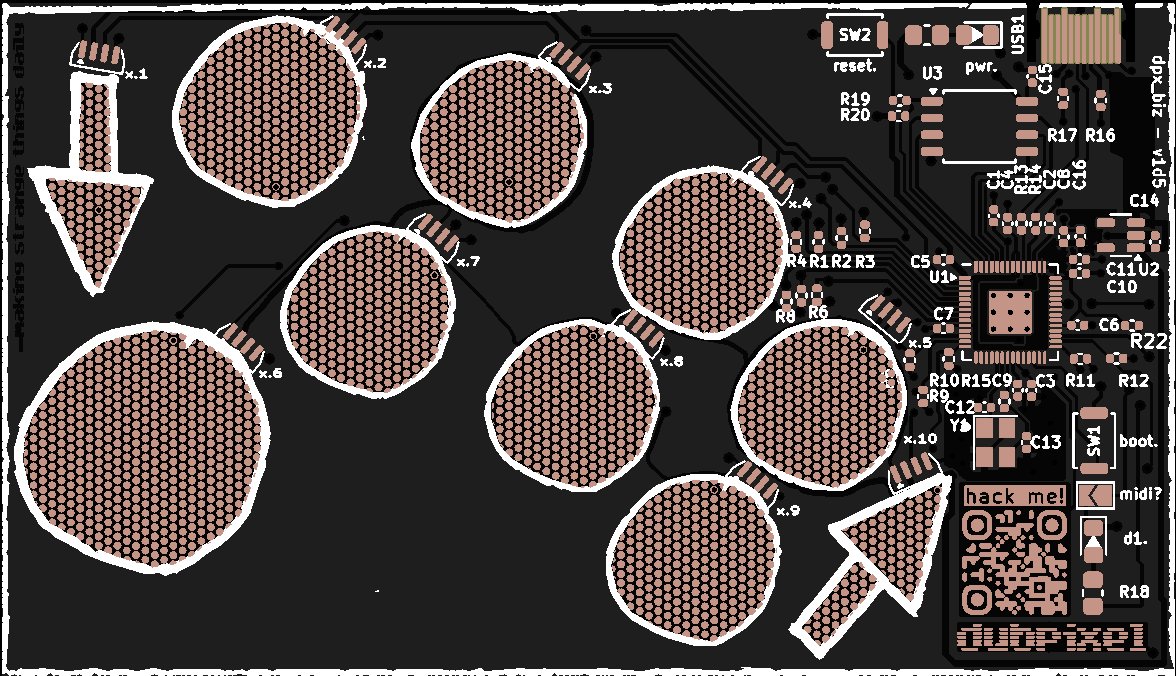
hover the steps below to see the buttons
enter_bootloader
- Hold the RESET button (top-right, near the USB port)
- While holding RESET, press and release the BOOT button
- Release RESET
- The card appears as a
RPI-RP2USB drive on your computer
⚠ desktop or laptop only. this needs a real computer, phones/tablets don't support flashing new firmware.
flash_the_base_firmware
- Download the current firmware: dpx_biz_frm_v0d5d7.uf2
- With the card in bootloader mode (see above), drag the
.uf2file onto theRPI-RP2drive - The card reboots automatically once the copy finishes. you're done
this is the default/base firmware. same one this whole reference site documents (d3 designer key mappings, MIDI notes, config.txt system). Reflashing it is mainly for recovering a bricked card or resetting to a known-good build.
build_your_own
Want to go beyond what config.txt can do. different sensing behavior, new modes, a totally different project on the same hardware? Start from the firmware template instead of this card's default build.
dpx_biz_qwikstrt. live template site
walkthrough for starting your own firmware from scratch
dpx_biz_qwikstrt. repo
clone it, open in PlatformIO, start building
once you've got the template open, building for the card is:
pio run -e pico
output lands at .pio/build/pico/firmware.uf2. drag that to RPI-RP2 the same way as above.